Imagine earning money from a digital product you created last week while you are studying, working your regular job, or spending time with friends. You do not need to manufacture physical products, rent a storefront, or purchase expensive equipment to get started.
That is the appeal of digital products. You create something useful once, list it online, and sell copies to multiple customers without having to recreate the entire product for every order.
In 2026, this model is especially attractive to Gen Z and millennials looking for flexible ways to supplement their income. With housing, groceries, transportation, and other living expenses putting pressure on American budgets, an additional income stream can offer more financial breathing room.
However, there is an important distinction: zero-investment does not mean zero effort, and passive income does not mean guaranteed income. Free tools can help you start without paying for design software, but you will still need to invest time in creating products, finding customers, and improving your listings.
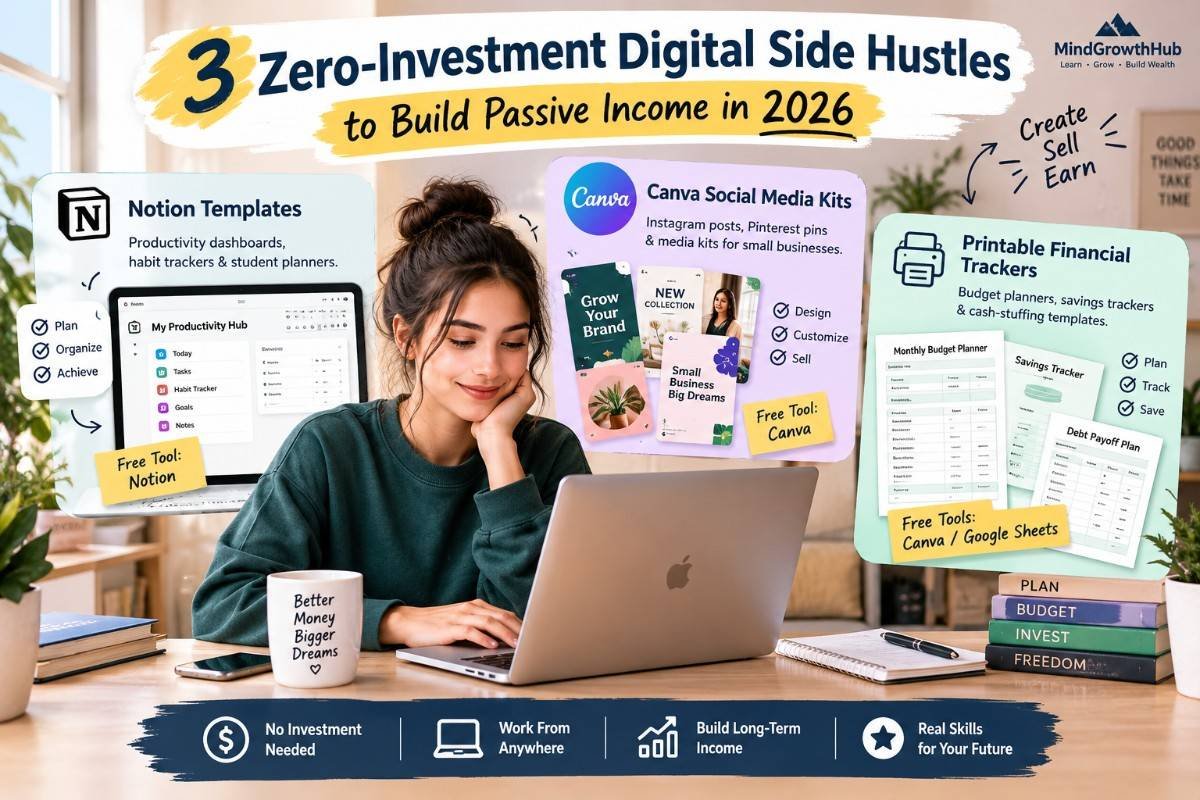
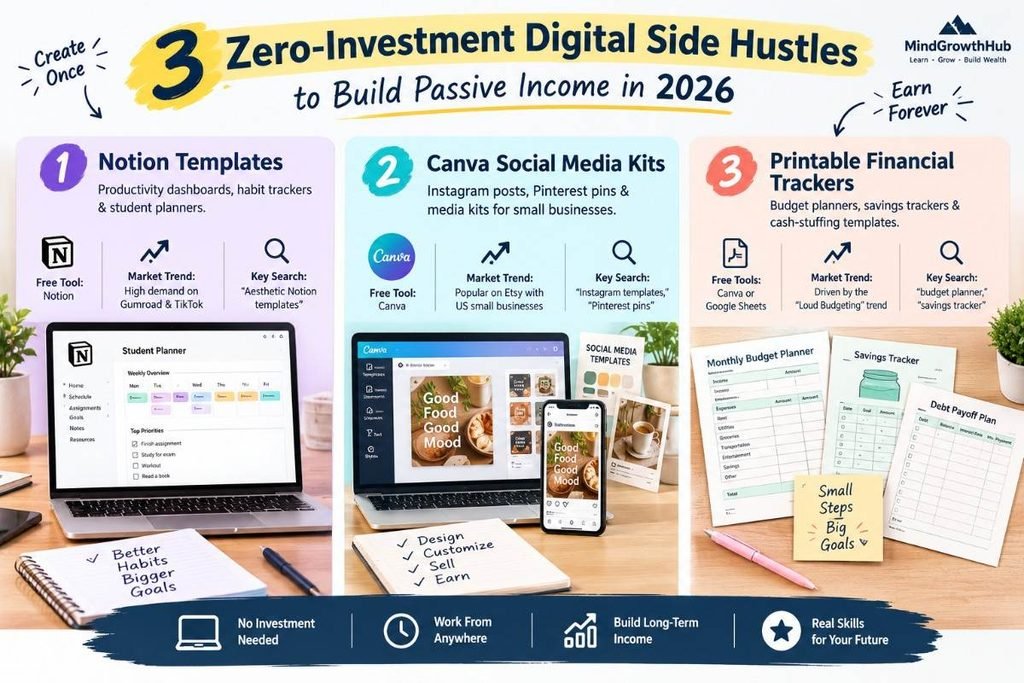
In this guide, we will explore three beginner-friendly digital side hustles: Notion templates, Canva social media kits, and printable financial planners. Each can be started with free tools, although marketplace fees, optional upgrades, taxes, and other costs may apply.
What Is a Digital Product Side Hustle?
A digital product side hustle involves creating a downloadable or reusable resource that customers can purchase online. Instead of selling your time for every transaction, you create a product that can be delivered repeatedly.
Examples include:
- Productivity dashboards and student planners.
- Instagram templates and Pinterest graphics.
- Printable budget planners and savings trackers.
- Digital worksheets, checklists, and organizational tools.
- Editable business documents and content planning resources.
The business model is simple: identify a problem, create a useful solution, present it to the right audience, and make it available for purchase.
Unlike traditional freelancing, where you usually exchange hours for payment, digital products can potentially generate sales without requiring you to be present for every transaction.
Still, sales depend on product quality, demand, pricing, discoverability, and customer trust. A product that receives no traffic will rarely generate consistent revenue, no matter how attractive it looks.
Side Hustle #1: Notion Templates
What Is the Opportunity?
Notion is a productivity platform that allows users to organize notes, projects, tasks, databases, and personal workflows. Its flexible structure makes it possible to create customized dashboards for students, professionals, creators, and people managing everyday responsibilities.
Instead of simply using Notion for yourself, you can build a reusable template and sell copies to people who want a ready-made system.
The opportunity is particularly appealing to users who enjoy organizing information and designing efficient workflows. Rather than asking customers to build everything from scratch, your template gives them a starting point they can customize.
What Can You Create?
You do not need to build a complicated productivity system to create a useful product. Start with one specific audience and solve one clear problem.
Consider these ideas:
1. Student planners
Create a dashboard that helps college students manage assignments, exams, deadlines, and study schedules.
You could include a weekly planner, assignment tracker, reading list, and semester overview. The goal is to help students organize their academic responsibilities without juggling multiple documents.
2. Habit trackers
Design a simple system for tracking daily routines, reading goals, exercise sessions, or personal projects.
Keep the layout intuitive and avoid adding features that make the template unnecessarily complicated. Customers often appreciate a system they can understand within minutes.
3. Personal productivity dashboards
Create a central workspace for tasks, goals, notes, and weekly planning.
You might design versions for busy professionals, freelancers, content creators, or people who want to organize personal projects.
4. Budget and finance dashboards
Build a simple dashboard for tracking income, spending categories, savings goals, and upcoming bills.
If you create a financial template, make it clear that it is an organizational tool rather than personalized financial advice.
Free Tools You Need
You can start with a free Notion account. Use Notion’s built-in pages, databases, views, and formatting options to build and test your template.
Before selling it, create a separate test copy and check that the links, formulas, instructions, and database views work as intended.
You can also use free graphic design tools to create product preview images. These images help potential customers understand what they are purchasing before they open the listing.
How to Create Your First Notion Template
Step 1: Choose a narrow audience.
Avoid creating a generic dashboard for everyone. A planner specifically designed for college students preparing for exams may be easier to explain and market than an all-purpose productivity system.
Step 2: Identify a real problem.
Explore public discussions, product reviews, and comments to understand what your target audience struggles with. Look for recurring complaints about disorganized assignments, confusing dashboards, or difficult-to-maintain routines.
Do not assume that a popular product automatically proves demand for your version. Look for a clear reason why someone would choose your template.
Step 3: Build a simple solution.
Create only the pages and features needed to solve the problem. For example, a student planner might include an assignment database, weekly schedule, deadline view, and exam preparation checklist.
Step 4: Test the customer experience.
Duplicate the template as if you were a customer using it for the first time. Make sure the instructions are clear and that the product does not depend on access to your personal information.
Step 5: Create a sales page.
Use screenshots and a concise description to show what the customer receives, who the template is for, and how it helps.
Explain any limitations, required accounts, or setup steps before purchase.
Where Can You Sell Notion Templates?
Gumroad is one option for selling digital products directly to customers. You can create a product page, upload supporting files or instructions, and provide access to the Notion template.
Explore the official platform at Gumroad.
You can also investigate Notion’s own template discovery options and other marketplaces that support digital downloads. Compare their current fees, eligibility requirements, and distribution features before choosing where to sell.
How to Market Your Templates
Short-form content can demonstrate the value of your product more effectively than a simple advertisement.
For example, you could create a TikTok video showing how a messy assignment list becomes an organized semester dashboard. A before-and-after demonstration gives viewers a clear reason to consider the template.
Potential content ideas include:
- “How I organize an entire semester in Notion.”
- “A simple weekly planning system for college students.”
- “Three Notion features that make task management easier.”
- “How to build a habit tracker without complicated apps.”
Use relevant search phrases naturally in your product titles, descriptions, and content. Terms such as aesthetic Notion templates, student planner, and habit tracker can help you communicate what your product offers.
Treat those phrases as keyword ideas to validate, not proof that a particular term currently has high search volume. Check marketplace search suggestions and available keyword research data before making strong demand claims.
Is This Side Hustle Right for You?
Notion templates may be a good fit if you enjoy organizing information, simplifying workflows, and helping people solve everyday problems.
The main challenge is differentiation. Generic planners face competition, so your product needs a clear audience, useful features, and an appealing presentation.
Start with one focused template, learn from customer feedback, and expand only when you understand what buyers actually want.
Side Hustle #2: Canva Social Media Kits and Presets
Why Social Media Templates Have Potential
Small businesses need social media content to promote their services, announce offers, and maintain a recognizable brand. However, many business owners do not have the time or design experience to create every post from scratch.
That creates an opportunity for digital creators who can design practical, reusable content kits.
Using Canva’s free version, you can create editable layouts for businesses that need consistent visual content. Your customers receive a starting point they can customize instead of paying for every individual graphic.
+What Can You Sell?
Focus on a particular business type rather than creating a bundle with no clear audience.
1. Instagram post bundles
Create coordinated posts for coffee shops, fitness instructors, beauty businesses, real estate agents, or independent service providers.
A bundle could include promotional posts, frequently asked questions, customer testimonials, service announcements, and educational graphics.
2. Pinterest pin templates
Design vertical graphics for bloggers, online shops, food creators, and businesses that use Pinterest to share useful content.
Make the text easy to read and leave enough space for customers to insert their own titles and images.
3. Small-business media kits
Create customizable documents that content creators and small businesses can use to present their services, audience information, brand identity, and collaboration options.
Keep the layouts professional and easy to edit. Clearly explain which sections customers should customize before sharing the document.
4. Monthly content planning kits
Combine post templates with a simple content calendar, caption prompts, and a checklist for planning promotional campaigns.
This gives customers more than a collection of attractive graphics. It helps them organize the work required to publish consistently.
Free Tools You Need
Start with Canva’s free version. It provides design tools and free elements that can be used to build many types of social media templates.
Be careful when using stock photos, illustrations, fonts, and other design assets. Canva’s licensing rules distinguish between different content types and uses, so check the current terms before including assets in a product you intend to sell.
Do not simply resell Canva elements or lightly modified stock graphics as if you created the underlying assets. Build original layouts and ensure that your product and delivery method comply with the applicable licensing terms.
You can begin at Canva.
How to Create a Social Media Kit
Step 1: Select a business niche.
Choose an audience you understand, such as local restaurants, personal trainers, cleaning services, or independent beauty professionals.
A specific niche makes it easier to decide which colors, layouts, messages, and content formats will be useful.
Step 2: Research common marketing needs.
A restaurant might need daily specials, menu highlights, and event announcements. A fitness instructor might need workout tips, class schedules, and introductory offers.
Use these needs to determine which templates belong in your bundle.
Step 3: Design a consistent collection.
Choose a cohesive visual style and make sure the templates look like parts of the same kit.
Include enough variety to support different types of posts without overwhelming the customer with dozens of nearly identical designs.
Step 4: Make customization easy.
Use clearly editable text, sensible spacing, and straightforward layouts. Include brief instructions explaining how to replace text, images, colors, and business details.
Step 5: Create realistic previews.
Show several examples of the templates in use. Explain what is included, which elements are editable, and whether the customer needs a Canva account or any paid features.
Where Can You Sell Canva Templates?
Etsy is one marketplace to consider for downloadable design products. Potential customers can discover listings through marketplace search, although competition and visibility vary by product category and listing quality.
Visit Etsy to review the current digital product rules, seller fees, and listing requirements.
You can also explore direct sales through your own audience or a digital product storefront. Before listing anything, confirm that your delivery format and use of design assets comply with the relevant platform and licensing policies.
How to Find Customers
Your marketing should demonstrate how the template saves time or solves a specific problem.
For example, create a short video showing how a small business can customize several coordinated posts for an upcoming promotion. You can also publish educational content about common design mistakes or ways to maintain consistent branding.
Try content ideas such as:
- “Five Instagram post ideas for a local coffee shop.”
- “How to create a consistent brand look without hiring a designer.”
- “A week’s worth of social media layouts for a small business.”
- “What to include in a simple creator media kit.”
For search optimization, describe your product accurately using terms related to its audience and purpose, such as Instagram templates for small businesses or editable Pinterest pin templates.
Do not promise that a template will automatically increase sales or engagement. Your product can make content creation easier, but business results depend on many factors beyond design.
Is This Side Hustle Right for You?
Canva social media kits may suit people who enjoy visual design, branding, and content creation.
The main challenge is producing original work that stands out in a crowded marketplace. You also need to understand licensing requirements and create templates that customers can edit without frustration.
Start with one niche-specific bundle, gather feedback, and improve the product before building a large catalog.
Side Hustle #3: Printable Budget Planners and Financial Trackers
Why Financial Printables Appeal to Budget-Conscious Buyers
Many people want to understand where their money goes, plan upcoming expenses, and work toward savings goals. A printable financial planner gives them a physical worksheet they can keep on a desk, place in a binder, or use during a weekly money review.
The growing interest in transparent spending conversations, including the Loud Budgeting trend, provides a useful context for creating resources that make budgeting feel more approachable.
However, do not assume that every trend automatically creates strong sales. Research competing products, customer reviews, and search behavior to validate which printables people are actively looking for.
What Can You Create?
1. Monthly budget worksheets
Create a printable sheet for recording expected income, essential bills, variable expenses, debt payments, and savings contributions.
Use clear categories and enough writing space to make the worksheet practical.
2. Savings goal trackers
Design simple progress charts for emergency savings, travel funds, education expenses, or other personal goals.
Avoid suggesting that everyone should have the same target. Financial circumstances differ, so customers should be able to customize their goals.
3. Cash-stuffing worksheets
Some budgeters use physical cash envelopes to organize spending into categories. You can design printable labels, allocation worksheets, and tracking sheets that help users record how much they plan to assign to each category.
Clearly distinguish between a worksheet that tracks cash and any physical banking or payment service. Your printable is an organizational resource, not a financial account.
4. Debt payment trackers
Create worksheets for listing balances, interest rates, minimum payments, due dates, and additional payments.
Keep the layout neutral and practical. Avoid promising that a particular tracking sheet will eliminate debt or improve someone’s financial situation without changes to their actual repayment behavior.
5. Subscription trackers
Design a worksheet where customers can record subscription names, billing dates, renewal frequency, and costs.
This can help users identify recurring charges and decide which services they still want to pay for.
Free Tools You Need
You can create printable worksheets using Canva’s free version or Google Sheets.
Canva is useful for visually appealing planners with clear headings, writing areas, and progress charts. Google Sheets is especially helpful for creating editable trackers with formulas and automatic totals.
Export your finished worksheets to PDF and test them before selling. Check page size, margins, font readability, and whether the document prints correctly on common US Letter paper.
If you offer international sizes such as A4, label them clearly so customers know which version to download.
How to Create Your First Financial Printable
Step 1: Choose one specific problem.
For example, you might create a monthly budget worksheet for beginners who want to track essential bills and discretionary spending.
Avoid combining every possible financial tool into one enormous planner before validating the basic idea.
Step 2: Make the worksheet easy to use.
Use plain language, readable text, and clear labels. Include brief instructions if the customer needs to calculate totals or move information between sections.
Step 3: Check the math.
If your worksheet contains formulas, test them with sample numbers. Verify that totals, remaining balances, and savings calculations work correctly.
If you sell a printable-only PDF, make sure the labels and calculations are understandable without additional software.
Step 4: Create useful product previews.
Show the worksheet on a clean background and include a close-up of the actual fields. Clearly state the file format, page size, number of pages, and whether the purchase includes a digital-only file.
Step 5: Test the complete buying experience.
Confirm that the delivered file opens properly and that customers can print it without cutting off important content.
Provide a simple usage guide and make the download process as clear as possible.
Where Can You Sell Financial Printables?
Etsy is one potential marketplace for printable planners and downloadable worksheets. You can also consider a digital storefront that allows you to sell PDF files directly.
Before opening a shop, check the platform’s current listing fees, transaction fees, payment processing charges, and rules for digital products.
Your listing should explain exactly what customers receive. For example, distinguish a printable PDF from an editable spreadsheet, and disclose whether any software or account is required.
How to Market Your Financial Printables
Your content should focus on making money management feel clearer and more manageable.
Possible content ideas include:
- “A simple weekly money check-in for beginners.”
- “How to organize recurring bills with a printable tracker.”
- “A monthly budget worksheet for people who hate complicated spreadsheets.”
- “How to track savings goals without using multiple apps.”
You can also create short demonstrations showing how a customer fills in a worksheet and uses it to organize upcoming expenses.
Use relevant keywords naturally in your listing title, description, and product images where appropriate. Examples include printable budget planner, savings tracker, and monthly expense worksheet.
Financial content requires particular care. Make it clear that your product is an organizational tool, not a promise of financial results or individualized advice.
Is This Side Hustle Right for You?
Printable financial trackers may suit creators who enjoy spreadsheets, simple design, and practical organization.
The main challenge is making the product genuinely useful rather than merely attractive. Buyers need readable layouts, correct calculations, clear instructions, and a straightforward printing experience.
You can start with one worksheet, collect customer feedback, and expand into a coordinated collection only after validating demand.
Head-to-Head Comparison: Which Side Hustle Should You Choose?
The following table compares the three business models using their startup tools, relative learning demands, and realistic planning expectations.
| Feature | Notion Templates | Canva Social Media Kits | Printable Financial Trackers |
| Startup tools | Notion free account | Canva free version | Canva free version or Google Sheets |
| Main product | Dashboards, planners, habit trackers | Instagram kits, Pinterest templates, media kits | Budget worksheets, savings trackers, cash-stuffing sheets |
| Relative difficulty | Medium | Easy to Medium | Easy to Medium |
| Main skill required | Organization and workflow design | Visual design and branding | Layout design and basic financial calculations |
| Potential sales channels | Gumroad, Notion template discovery options | Etsy, direct digital storefronts | Etsy, direct digital storefronts |
| Potential earning timeline | First sale could take days, weeks, or longer | First sale could take days, weeks, or longer | First sale could take days, weeks, or longer |
| Ongoing work | Support, updates, promotion | Updates, customer support, promotion | File maintenance, support, promotion |
| Best for | Productivity enthusiasts | Creators and visual designers | Organized, detail-oriented creators |
The difficulty ratings are relative estimates, not guarantees. The earning timelines are illustrative: none of these hustles has a reliable or guaranteed time to first sale.
How Much Can You Earn?
There is no universal income figure for these side hustles. Your results depend on product quality, pricing, competition, traffic, customer demand, and the fees charged by your sales platform.
Instead of relying on unrealistic income promises, use simple calculations to understand what your sales targets would require.
For example, if you sell a digital product for $10 and make 20 sales, your gross revenue is $200 before marketplace fees, payment processing costs, refunds, taxes, and other expenses.
That is a planning example, not a prediction of what you will earn. A product might sell several copies, generate occasional sales, or receive no sales at all.
Your first goal should be to validate demand, not to replace your full-time income immediately.

How to Start Your Zero-Investment Side Hustle in 30 Days
You do not need to build a complete digital product business in one weekend. A focused, four-week plan can help you move from an idea to a published listing.
Week 1: Research and Choose Your Product
Pick one audience and one problem.
Review existing products, read customer feedback, and identify what buyers want improved. Write down the specific benefit your product will provide and how it will differ from existing options.
Week 2: Create Your First Product
Use free tools to build a small, functional product. Prioritize usefulness, clarity, and quality over adding lots of features.
Ask a few people from your intended audience to test it, if possible. Use their feedback to fix confusing instructions, missing features, or design problems.
Week 3: Publish Your Listing
Choose an appropriate sales platform and review its current rules and fees. Create clear product images, write a descriptive title, explain what is included, and provide accurate delivery instructions.
Before publishing, confirm that your product does not contain unlicensed assets or copyrighted material that you do not have permission to use.
Week 4: Market and Improve
Publish useful content that demonstrates your product solving a real problem. Try different educational posts, short demonstrations, and relevant search phrases.
Monitor views, clicks, sales, and customer questions where the platform provides those metrics. If people visit your listing but do not purchase, review the price, previews, product description, and clarity of the offer.
If almost nobody sees your listing, focus on improving discovery and reaching the right audience. Make changes based on evidence rather than repeatedly rebuilding the entire product.
Common Mistakes to Avoid
Creating products before researching demand. A beautiful product can still struggle if the audience does not need it. Validate the problem before investing too much time.
Trying to target everyone. A planner designed for a specific customer is easier to explain than a generic product that claims to solve every problem.
Ignoring platform fees. Free design tools do not eliminate marketplace, payment processing, or potential promotional costs. Calculate your approximate net earnings before choosing a price.
Using unlicensed assets. Check the terms for fonts, images, graphics, and templates before selling a product that includes them.
Expecting immediate passive income. Digital products can be delivered automatically, but marketing, product updates, and customer support still require work.
Giving up after one listing. A lack of sales is a reason to investigate the product, audience, and marketing strategy. It does not automatically mean the entire business model is unsuitable.
Conclusion: Pick One Hustle and Start Small
Building a digital product side hustle in 2026 does not require an expensive software subscription or a large inventory. You can start with free tools, a clear idea, and a willingness to learn what customers actually need.
Choose Notion templates if you enjoy organizing information and building productivity systems. Choose Canva social media kits if you like design and understand how businesses communicate online. Choose printable financial trackers if you enjoy creating practical worksheets that make everyday money management easier.
Do not try to launch all three at once. Choose one idea, create a useful first product, publish it, and spend the next few weeks learning from real audience behavior.
Your first product does not have to be perfect. It needs to solve a real problem, be easy to use, and give customers a clear reason to consider buying it.
Most importantly, treat this as a business experiment rather than guaranteed passive income. Start small, protect your time, track your expenses, and expand only when you have evidence that people want what you are creating.
Legal Disclaimer
This article is provided by MindGrowthHub for educational and informational purposes only. It is not financial, investment, tax, legal, or business advice, and it does not guarantee earnings or business success. Digital product income varies widely and may be affected by demand, competition, marketing, platform fees, refunds, and operating expenses. Free tools and marketplaces may change their features, pricing, licensing terms, and eligibility requirements. Before selling digital products, review the relevant platform terms and intellectual property rules. You are responsible for understanding and complying with applicable US tax obligations and other legal requirements. Consider consulting a qualified professional for advice specific to your circumstances.
Related Articles
The 50/30/20 Budget Rule Explained for Beginners (A Simple Guide to Managing Money Without Stress)
A simple framework for organizing needs, wants, and savings without making your budget feel overwhelming.
Emergency Fund 101: How Much Money Should You Really Save?
A practical next read for building a financial cushion for unexpected expenses.
10 Money Habits That Keep People Poor (Without Them Realizing)
Explore the everyday money behaviors that can quietly make saving and wealth-building harder.
Cash Stuffing vs Digital Budgeting: Which One Actually Helps You Save More?
Compare a traditional cash-based approach with modern digital budgeting.
The Hidden Cost of Lifestyle Inflation (And How to Escape It)
See how higher income can disappear when spending rises just as quickly.
Why Most People Never Become Financially Free
Learn how spending, saving, debt, and everyday financial habits can shape long-term financial freedom.
How to Build Wealth Even If You Start Late
A useful follow-up for readers who want to turn better saving habits into long-term wealth.